AI governance

    Prove what your AI did, and why.

    See what Metis did, who used it and how your guardrails and fairness reviews apply. When your board, auditor or regulator asks what the AI did, on what data and under whose authority, start with the evidence.

    • Activity you can inspect
    • Guardrails and threat logs
    • Fairness reviews by signal
    • Your rules, your console

    AI governance stopped being optional this year.

    Two developments matter for Australian organisations using AI in workforce decisions.

    Automated decisions must be disclosed where the new rules apply.

    From 10 December 2026, APP entities must include additional information in their privacy policy where they arrange for a computer program to use personal information to make a decision, or do something substantially and directly related to making a decision, that could reasonably be expected to significantly affect an individual's rights or interests. The disclosure covers the kinds of personal information used and the kinds of decisions involved. Human review doesn't necessarily take a use outside the obligation. Read the OAIC's APP 1 guidance.

    There's a national playbook.

    The National AI Centre's Guidance for AI Adoption sets out six essential practices: decide who is accountable, understand impacts and plan accordingly, measure and manage risks, share essential information, test and monitor, and maintain human control. It's a practical framework for organising your governance work, not a substitute for meeting the law.

    Metis brings activity information, guardrail results and ethics reviews into that work. Your organisation still needs to map its use cases, assign responsibility and decide what evidence each decision needs.

    Whether the disclosure obligation applies to a particular workforce decision depends on your circumstances, including the Privacy Act's employee records exemption. Get advice on your organisation's position.

    Four controls. One system of record for your AI.

    Most AI governance lives in a policy document nobody can test. Metis brings the controls into the platform, so your governance process has evidence to work with.

    Telemetry

    See AI activity, its cost and who triggered it.

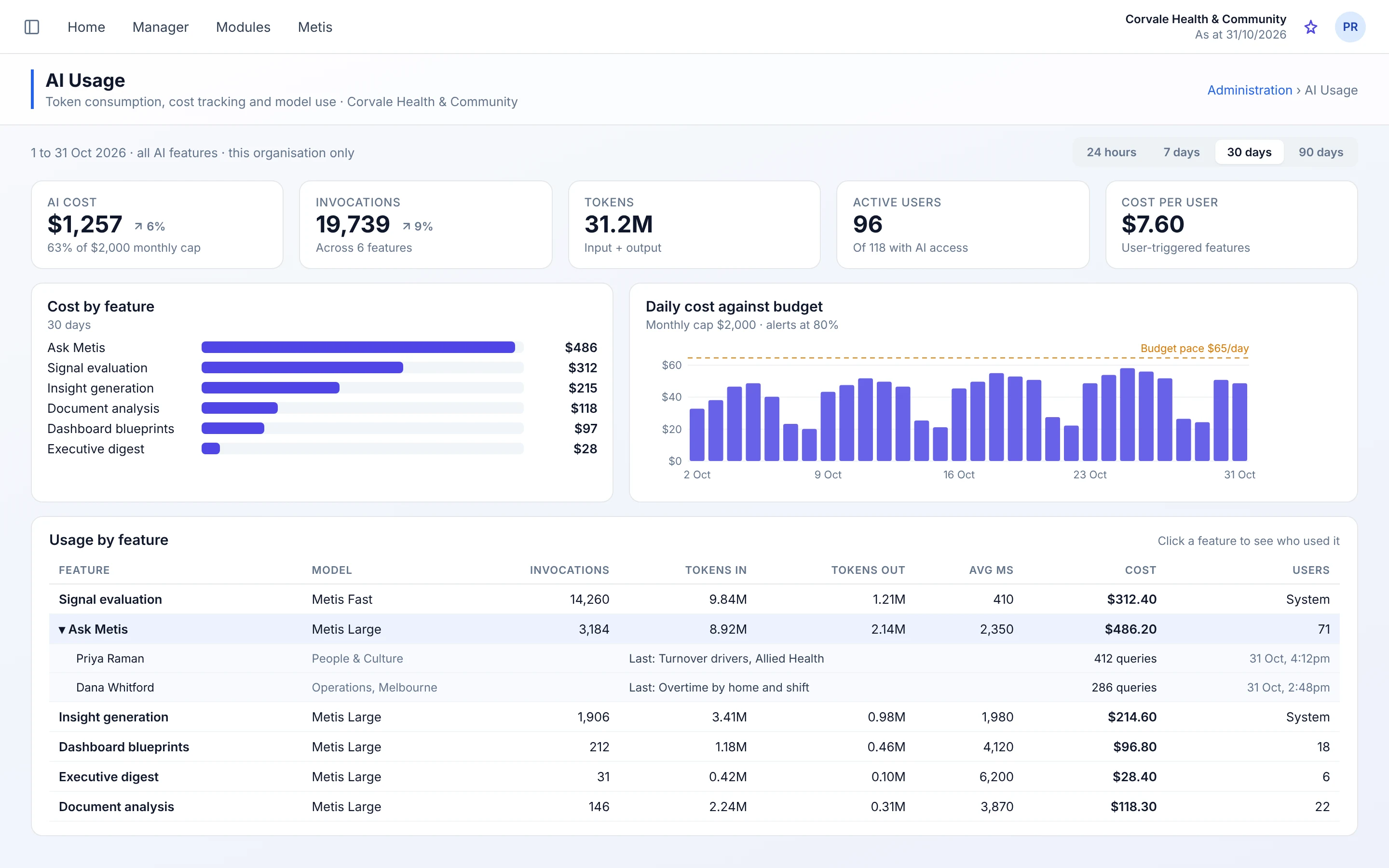
    Track invocations, tokens and cost by feature. Compare usage across 24-hour, 7-day, 30-day and 90-day views, see spend against a monthly cap and drill into a feature to review individual user activity.

    Guardrails

    Set boundaries and see how they're enforced.

    Review prompt-injection attempts, requests outside a user's data permissions and protected actions. Threat logs show what was detected, its severity and whether the response was blocked, redacted or reset.

    Bias management

    Test outcomes, not intentions.

    Compare fairness ratios across groups such as gender and age band. Bring flagged results into a review queue with a named owner and a status, so a finding has someone responsible for investigating it.

    Configuration and control

    Your organisation decides what AI does.

    Bring AI configuration, protected-action policies and human-review requirements into your governance process. Check the available feature controls, permission scope and approval rules against the decisions your people make.

    The evidence trail

    When someone asks what the AI did, you already have a starting point.

    A director asks about a flight-risk warning. An auditor asks what informed a pay recommendation. An employee asks how a decision about them was made. These are the questions your evidence needs to answer.

    What it did.

    Identify the feature and activity involved. Connect the AI output to the workforce decision you're reviewing.

    What it used.

    Establish the relevant data sources and permissions. Check the record detail available for the feature in question.

    Why it said it.

    Review the explanation and any guardrail or fairness findings alongside the result.

    Who acted.

    Bring the review owner, status and any override into the record of the human decision.

    Keep explanations, activity and human review connected. Leave less to reconstruct after the fact.

    The AI Usage screen shows feature costs, tokens and user activity. It doesn't show every decision-trail field. Ask us to demonstrate the record detail for your use cases.

    Metis AI Usage showing costs, invocations, tokens, active users and a feature breakdown with individual user activity.

    Built around the six practices your board can use.

    How Metis supports the work. This mapping isn't a certification or a guarantee of compliance.

    The six Guidance for AI Adoption practices and supporting Metis evidence
    PracticeWhat Metis contributes
    Decide who is accountableReview owners, review statuses and configuration records help you identify who needs to answer a governance question. Your organisation still needs to assign accountability.
    Understand impacts and plan accordinglyUse feature and activity information to build your AI register and assess which personal information and workforce decisions each use involves.
    Measure and manage risksGuardrail logs, protected-action settings and fairness results give you evidence to use in your risk assessments and reviews.
    Share essential informationExplanations, review records and usage information help you explain AI use to the people who need to understand it.
    Test and monitorCompare usage, cost, threat-log entries and fairness findings over time. Include your own testing and follow-up when results change.
    Maintain human controlProtected-action policies, reviews and AI configuration controls help your organisation set boundaries and keep people responsible for decisions.

    Practice names follow the National AI Centre's Guidance for AI Adoption.

    Built for the officers who carry the risk.

    Board and audit committee

    Start with a clear account of what AI ran, what it cost, what was blocked and what needs review. Use those records to support your governance reporting, and check the reporting format you need during a walkthrough.

    Chief people officer

    Set expectations for explainability and human review. The ethics workspace brings policy settings, fairness findings and reviews together, so sensitive people decisions stay part of your governance process.

    CIO and security

    Inspect guardrail enforcement and protected actions. Review the model, versioning, isolation and security-testing evidence that applies to your deployment through the Trust Centre before you sign off.

    Privacy officer

    Map AI features to personal information and decision types. Use that inventory to assess your transparency obligations, identify gaps and prepare disclosures with your privacy adviser.

    Data handling belongs in the evidence too. Review the Trust Centre for current security information and to request supporting material.

    Inside the AI governance workspace

    See the controls.

    Inspect AI usage and cost, guardrails, and AI ethics and fairness. Click any of the three screens to see the detail.

    Governance questions

    What your board and reviewers will ask.

    See your AI governance before your board asks for it.

    We'll walk through the four controls on a workforce like yours, and show you the evidence available for your governance process.

    Book my governance walkthrough

    No lock-in. No sales pressure.

    Sources

    This guide is general information for Australian employers, current as at 26 November 2026. It isn't legal, tax or financial advice and doesn't create a client relationship with EmployeeConnect. Your obligations depend on your circumstances, including the awards, agreements and contracts that apply to your people, and the law changes. Check the linked sources and get qualified advice before making decisions about pay, employment, privacy or AI.